Usage and credit history
See how many credits you have left and a full history of what you have used them on.
The Usage page keeps track of your credits: how many you have left, and where they went. Open Usage from the menu to see it.
Your balance
At the top is your Credit Balance, the credits you have left to make clips with. If you are running low, you can top up right there.
Your history
Below that is your Usage History, a list of everything you have spent credits on. Each row shows:
- When it happened.
- What it was: Video Processing when Cliphi went through a video to find clips, or Clip Rendering when you made a final clip.
- How long the video or clip was, and how many credits it took.
- Which video it came from.
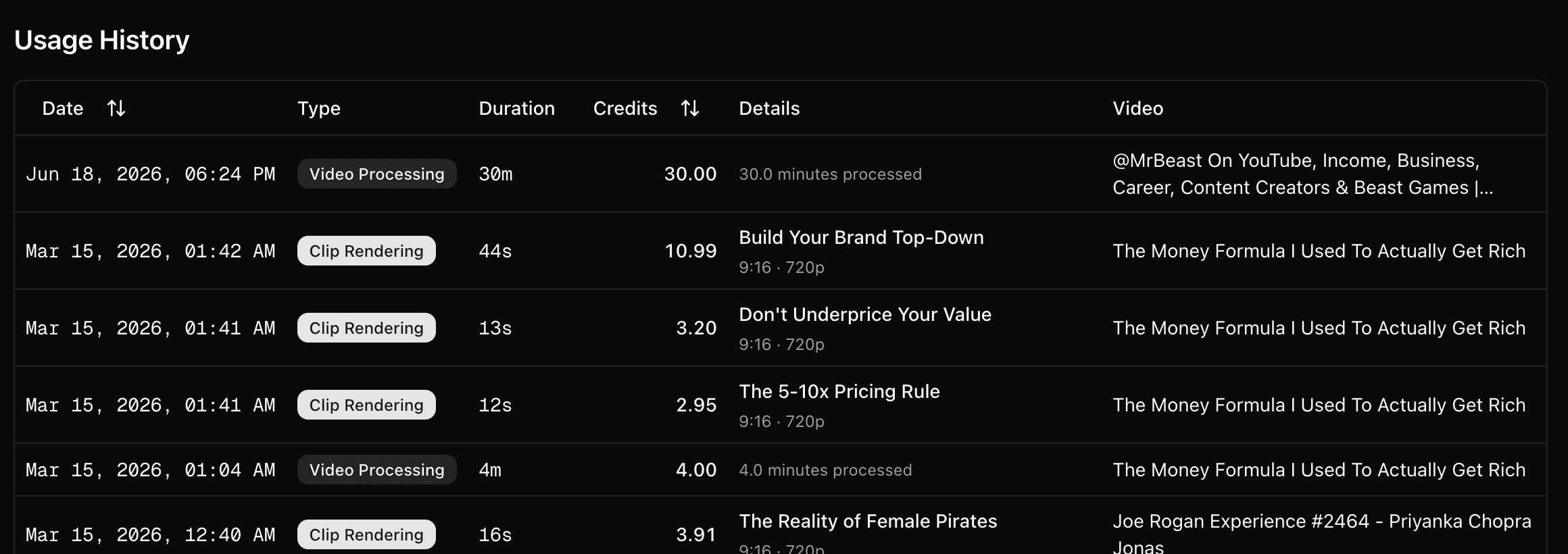
This is the easiest way to see where your credits go, so you know what a video or a clip usually costs you.
What's next
- What costs credits: How credits work.
- Change your plan or buy more: Manage your subscription.
Last updated on